Does that VR game work on your headset?
Our free extension answers that while you browse, without you searching for anything. It's the first tool vr.ar has built, and it's as free as the rest of the site.
- Free
- No account
- No ads
- Collects no data
- 90 verified games
- English and Spanish
The problem
You're reading an article about a VR game, or looking at its Steam page, and the same question shows up: will this run on the headset I own? Finding out takes four searches and ten minutes, because every game ships on some platforms and not others, and the stores rarely say it plainly.
How it works
- You install it and pick your headset once. No account, no sign-up.
- You browse normally. On Steam and the PlayStation Store it works the moment you install it; on any other page you turn it on with a button, when you want to.
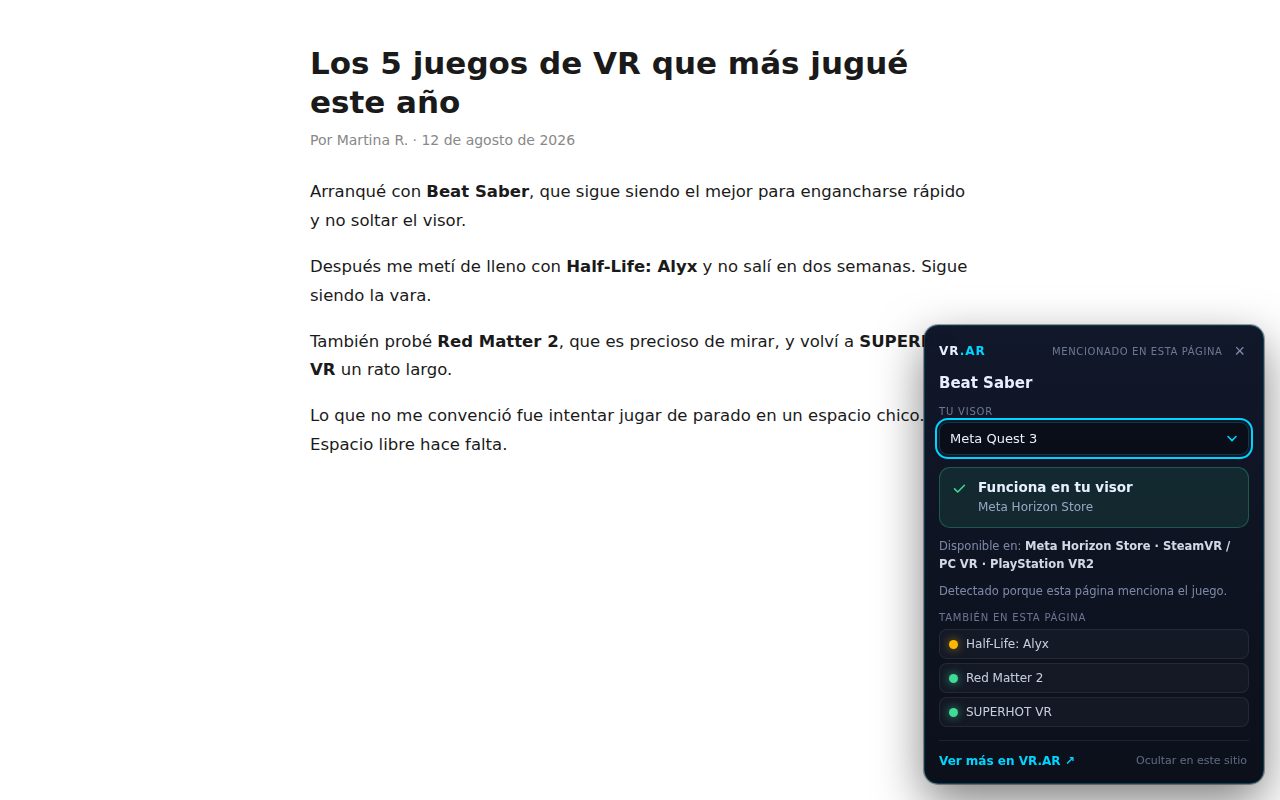
- When a page mentions a game from the catalogue, a small card appears at the bottom right with the answer. If it detects nothing, nothing appears.
The four possible answers
A plain yes or no almost never does the job in VR: the same game can run natively on your headset, run only with a PC powerful enough, or simply not exist for you. The card tells the four cases apart.
It runs on your headset with nothing else. It tells you which store it's on: the Meta Horizon Store, the PlayStation Store or the PICO store.
You need a computer that can run it, and a connection to the headset. This includes the PS VR2 PC adapter route.
We verified it isn't available for your model, and we tell you which platforms it is on, in case you own another one.
We don't have confirmed data for your model, and we say so rather than inventing an answer.
That fourth case is the one we care about most. The catalogue has 90 games, verified one by one, platform by platform, and it doesn't include every game that exists. A wrong compatibility answer is worse than no answer: it makes you buy something you won't be able to use. Title matching is strict too, so "War Thunder Mobile" is never confused with "War Thunder".
Where it works
On Steam and the PlayStation Store it works from the moment you install it, with no extra permissions. On any other page — blogs, articles, reviews, forums — it works if you grant access with a button inside the extension. We built it that way on purpose: asking for access to the whole web at install time is uncomfortable, and it shouldn't be mandatory just to try something.
Supported headsets
- Meta Quest 3
- Meta Quest 3S
- Meta Quest 2
- PlayStation VR2
- PICO 4
- PICO 4 Ultra
- Valve Index
- HTC Vive
What data it takes
None. All the work happens inside your browser: the extension reads the title of the page you're on, compares it against a catalogue that ships inside the package, and shows the result. There are no accounts, no analytics, no history, and nothing is sent to any server. The only thing stored, on your own machine, is the headset you picked. It's all spelled out in the extension's privacy policy.
Install it free
Works in Chrome, Edge and any Chromium-based browser. Two clicks to uninstall if it isn't for you.
The extension is free and contains no advertising. See our Privacy Policy.